Migrating off IBM DOORS involves four steps: audit which DOORS features your team actually uses, export modules to CSV or ReqIF with link tables intact, rebuild traceability in the new tool, and run both systems in parallel for two to four weeks. Most teams use only modules, attributes, parent-child links, and CSV export, far less than they license.
Prefer watching? Migrating Requirements Out of IBM DOORS — self-hosted, no tracking.
Transcript
A DOORS migration starts with an export. This is a CSV pulled from a DOORS propulsion module: fourteen requirements, with the Object Identifier, Object Heading, Object Text, and crucially the Parent Identifier column that carries the traceability.
The import wizard takes ReqIF or CSV. ReqIF preserves more metadata, but CSV is the export every DOORS administrator already knows how to produce, so that is what this walkthrough uses.
After parsing, the mapping step is where the real work happens. The importer matches Type, Status, Priority, and Verification Method automatically because those column names line up. What it cannot guess are DOORS's own names: Object Identifier, Object Heading, Object Text, and Parent Identifier.
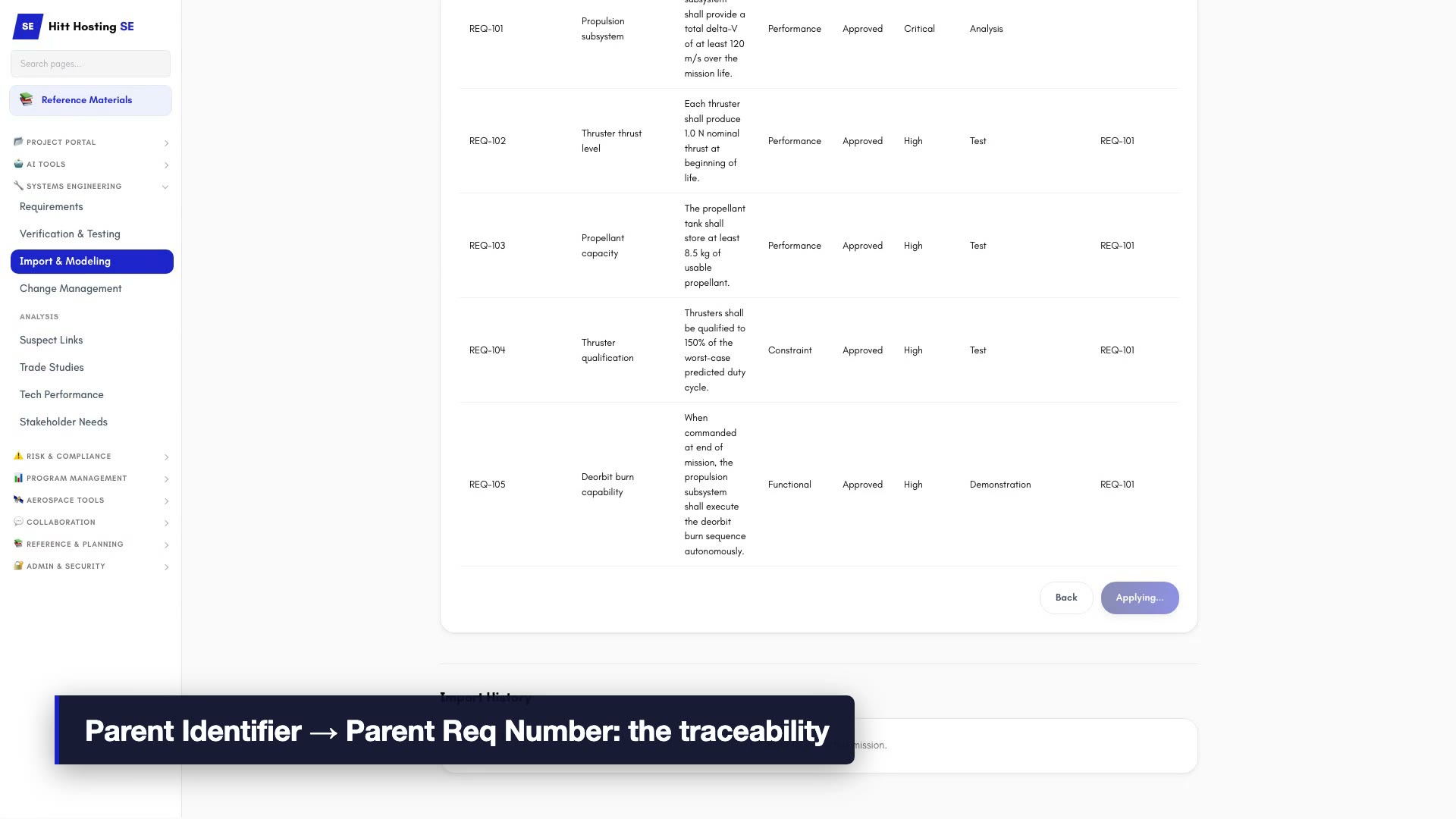
Object Identifier maps to Req Number, Object Heading to Title, Object Text to Description. Those three are mechanical. The one that matters is Parent Identifier mapping to Parent Req Number. That single mapping is what turns a flat spreadsheet back into a requirement tree; skip it and you import orphans.
The preview is a dry run. It reports how many requirements are new, how many collide with requirements already in the mission, and how many trace links will be created. Two of these fourteen already exist in this program, so they show as conflicts.
Three conflict policies are available: skip duplicates and keep what exists, overwrite with the incoming data, or import under a suffixed number. For a first migration pass, skip duplicates is the safe default.
The result is the migration receipt: twelve imported, twelve trace links created, two skipped. Those three numbers are what you check before moving on, and every import is logged in the history table below, which becomes your audit trail when you migrate module by module over several weeks.
The verification step is the traceability matrix. Upstream coverage tells you how many requirements kept their parent through the export-and-import round trip. Orphans here would mean parent identifiers that did not resolve, usually because the parent lives in a module you have not imported yet.
Back in the requirements register, REQ-101 through REQ-112 are now part of the tree, each carrying its parent, its type, its status, and its verification method. In DOORS this reconciliation was a DXL script. Here it is the page you land on.
Why are teams leaving IBM DOORS?
IBM DOORS (Dynamic Object-Oriented Requirements System) has been the industry standard for requirements management in aerospace and defense since the 1990s. It is deeply embedded in contracts, processes, and institutional knowledge. But its cost structure, licensing complexity, and lack of integration with modern engineering workflows are pushing many programs to evaluate alternatives.
What should you audit before migrating?
Before migrating, audit what you actually use. Most DOORS deployments use a small subset of the available features. Run a survey of your engineers: which DOORS features do you use weekly? Which do you use only at gate reviews? Which have you never touched? In our experience the answer is consistent: modules, attributes, parent / child links, and CSV export. Almost everything else (DXL scripts, formal baselining, complex approval workflows) is used by a small minority and can be simplified or replaced.
How do you export requirements data from DOORS?
The first technical question in any DOORS migration is data extraction. DOORS stores requirements in modules with attributes, links, and baselines. The cleanest export path is CSV or ReqIF (Requirements Interchange Format). CSV captures the requirement text, attributes, and parent-child relationships. ReqIF preserves more metadata but requires a parser on the receiving end. Most modern requirements tools accept both.
Practical CSV export tip: use the DOORS "Export to CSV" with the "Include attribute headers" option enabled, and select "Object Identifier" plus all custom attributes. Use UTF-8 encoding to avoid character encoding issues with non-ASCII text (greek symbols, em dashes, etc.). Export each module separately rather than combining them; the importer will rebuild cross-module links from the IDs.
How do you preserve traceability links?
The second challenge is preserving traceability links. DOORS allows links between modules and across projects. When exporting to CSV, these links become ID references that need to be resolved in the new system. The key is exporting link tables alongside requirement modules so the relationship graph can be reconstructed. Most DOORS deployments have an "Outgoing Links" attribute that captures the destination IDs; preserve this column during export.
Which DOORS workflows and DXL scripts survive a migration?
The third consideration is workflow adaptation. DOORS supports formal baselining, change proposals, and approval workflows through DXL scripts and DOORS modules. Not every tool replaces these features identically. The question to ask is: which of these workflows are adding value, and which are adding ceremony? A migration is an opportunity to simplify.
A common surprise during migration: most DOORS DXL scripts have not been touched in years and no one remembers what they do. Before migrating, get the list of active scripts from your DOORS administrator and ask the original authors (if they are still around) what each one is for. You may find that 80% can be retired without anyone noticing. The remaining 20% are usually doing one of three things: enforcing an attribute convention, running a coverage report, or formatting an export. All three can be replaced with built-in features in modern tools.
What does a three-phase migration plan look like?
Plan the migration in three phases. Phase 1: pilot migration with one module (the smallest active one) to validate the export / import path and verify the traceability links survive. Phase 2: migrate active modules during a quiet period (between gate reviews if possible) and run both DOORS and the new tool in parallel for two to four weeks to catch discrepancies. Phase 3: deprecate DOORS for new work and archive the historical modules read-only.
| Phase | Scope | Goal |
|---|---|---|
| 1, Pilot | Smallest active module | Validate the export/import path and confirm traceability links survive |
| 2, Active modules | Migrate during a quiet period | Run DOORS and the new tool in parallel for 2–4 weeks to catch discrepancies |
| 3: Cutover | All new work | Deprecate DOORS for new work; archive historical modules read-only |
Do your contracts allow leaving DOORS?
Communicate the migration to your contracts team. Many DoD and NASA contracts reference DOORS-format deliverables explicitly. In most cases the customer accepts equivalent CSV / PDF / ReqIF deliverables, but you have to ask. A 30-day notice with a sample deliverable from the new tool usually gets a quick approval. Migrating without contractual cover is a recipe for awkward end-of-program conversations.
Migrating to Hitt Hosting SE
Hitt Hosting SE accepts CSV imports that preserve hierarchy and attributes. A typical DOORS migration takes under an hour: export the module as CSV, import into Hitt Hosting SE with column mapping, and verify the traceability matrix matches. The additional benefit is immediate access to budgets, risk registers, and phase gate tracking that DOORS does not provide. For most space programs, the savings on tool licensing alone pays for the migration in the first quarter.